Wednesday, October 29, 2014

EOL/Obsolete Software: Microsoft XML Core Services 4.0 Service Pack 2 Detected on Windows Based Vcenter server ( Security Scanner Detected Vulnerability)

Vulnerability: EOL/Obsolete Software: Microsoft XML Core Services 4.0 Service Pack 2 Detected

This is relaed to Microsoft security Vulnerabilities:

THREAT:
The host is running Microsoft XML Core Services 4.0 with Service Pack 2 installed. Microsoft ended support for Microsoft XML 4.0 SP2 on April 13,
2009 and provides no further support for that specific service pack level.
IMPACT:
The system is at high risk of being exposed

Solution: Since Microsoft  XML core services 6.0 released, uninstall this Microsoft XML 4.0 SP2 and install Microsoft  XML core services 6.0.

how to delete Microsoft XML 4.0 SP2 and SP3?

created batch file with below command and execute it. 

REM Script to quietly uninstall MSXML 4.0 and updates.


REM Changelog
REM v0.1 - initial version
REM v0.2 - updated titles and spacing

REM Uninstalling MSXML 4.0 SP2 and updates

REM Uninstalling MSXML 4.0 SP2 Parser and SDK (Base Installer - msxml.msi)
MsiExec.exe /uninstall {716E0306-8318-4364-8B8F-0CC4E9376BAC} /quiet
REM Uninstalling KB925672 (MS06-061 - msxml4-KB925672-enu.exe)
MsiExec.exe /uninstall {A9CF9052-F4A0-475D-A00F-A8388C62DD63} /quiet
REM Uninstalling KB927978 (MS06-071 - msxml4-KB927978-enu.exe)
MsiExec.exe /uninstall {37477865-A3F1-4772-AD43-AAFC6BCFF99F} /quiet
REM Uninstalling KB936181 (MS07-042 - msxml4-KB936181-enu.exe)
MsiExec.exe /uninstall {C04E32E0-0416-434D-AFB9-6969D703A9EF} /quiet
REM Uninstalling KB954430 (MS08-069 - msxml4-KB954430-enu.exe)
MsiExec.exe /uninstall {86493ADD-824D-4B8E-BD72-8C5DCDC52A71} /quiet
REM Uninstalling KB973688 (Non Security Update - msxml4-KB973688-enu.exe)
MsiExec.exe /uninstall {F662A8E6-F4DC-41A2-901E-8C11F044BDEC} /quiet

REM Uninstalling MSXML 4.0 SP3 and updates

REM Uninstalling MSXML 4.0 SP3 Parser (Base Installer - msxml.msi)
MsiExec.exe /uninstall {196467F1-C11F-4F76-858B-5812ADC83B94} /quiet
REM Uninstalling KB973685 (Non Security Update - msxml4-KB973685-enu.exe)
MsiExec.exe /uninstall {859DFA95-E4A6-48CD-B88E-A3E483E89B44} /quiet
REM Uninstalling KB2721691 (MS12-043 - msxml4-KB2721691-enu.exe)
MsiExec.exe /uninstall {355B5AC0-CEEE-42C5-AD4D-7F3CFD806C36} /quiet
REM Uninstalling KB2758694 (MS13-002 - msxml4-KB2758694-enu.exe)
MsiExec.exe /uninstall {1D95BA90-F4F8-47EC-A882-441C99D30C1E} /quiet

Tuesday, October 28, 2014

After Networker VADP completed backup, snapshots not removed and alert triggered VM required snapshot consolidation

Issue: after Networker VADP snapshot level backup completed, snapshot are not deleted in the data store and triggered VM required snapshot consolidationissue


Esxi Version: 5.0 U2


Temporary solution:  1) perform management agent restart on ESXi host and re-do the consolidation by selecting VM-right click- snapshot - consolidate option.

How to restart managemnet agent:    http://kb.vmware.com/selfservice/microsites/search.do?language=en_US&cmd=displayKC&externalId=1003490

permanent Solution: this issue related to VADP API version and EMC advised to upgrade the Networker 8.0  to Networker 8.0 SP1.

While detaching the unused LUN's ESXi 5.0 Host disconnected and isolated

Task: 
Recently I was assigned a task to remove 10 old unused LUN from ESXi 5.0 Hosts.

Issue: 

 when I tried to detach first 3 LUN,  it was successful but when I tried 4th LUN, task bar shows LUN detaching in progress for 30 Min's and Host Disconnected from vcenter.

After that I  SSH to the host and tried to execute esxcli commands. but unfortunately the whole command module was not available I cannot execute any cli esxcli commands. I re-started the management network and tried to rejoin back to vcenter but all failed.

 Temporary solution: 

I informed all the server owner and got downtime to shutdown all the VM's and rebooted the ESXi Hosts and re-connected to vcenter


up on checking the logs it's shown as below


2014-09-28T00:34:35.293Z cpu21:2263260)PowerPath: EmcpEsxLogEvent:1252: Info:emcp:MpxEsxVolProbe: Wait for volume to be unquiesced 2014-09-28T00:34:35.294Z cpu11:5668140)PowerPath: EmcpEsxLogEvent:1252: Info:emcp:MpxEsxVolProbe: Wait for volume to be unquiesced 2014-09-28T00:34:55.304Z cpu18:6691338)PowerPath: EmcpEsxLogEvent:1252: Info:emcp:MpxEsxVolProbe: Wait for volume to be unquiesced 2014-09-28T00:34:55.306Z cpu18:6691338)PowerPath: EmcpEsxLogEvent:1252: Info:emcp:MpxEsxVolProbe: Wait for volume to be unquiesced 2014-09-28T00:35:05.311Z cpu4:4316)PowerPath: EmcpEsxLogEvent:1252: Info:emcp:MpxEsxVolProbe: Wait for volume to be unquiesced 2014-09-28T00:35:05.312Z cpu4:4316)PowerPath: EmcpEsxLogEvent:1252: Info:emcp:MpxEsxVolProbe: Wait for volume to be unquiesced 2014-09-28T00:35:15.319Z cpu13:6692663)PowerPath: EmcpEsxLogEvent:1252: Info:emcp:MpxEsxVolProbe: Wait for volume to be unquiesced 2014-09-28T00:35:15.321Z cpu25:5114901)PowerPath: EmcpEsxLogEvent:1252: Info:emcp:MpxEsxVolProbe: Wait for volume to be unquiesced 2014-09-28T00:35:25.326Z cpu25:5114901)PowerPath: EmcpEsxLogEvent:1252: Info:emcp:MpxEsxVolProbe: Wait for volume to be unquiesced 2014-09-28T00:35:35.334Z cpu7:6692369)PowerPath: EmcpEsxLogEvent:1252: Info:emcp:MpxEsxVolProbe: Wait for volume to be unquiesced 2014-09-28T00:36:05.354Z cpu38:6692663)PowerPath: EmcpEsxLogEvent:1252: Info:emcp:MpxEsxVolProbe: Wait for volume to be unquiesced 2014-09-28T00:36:45.378Z cpu34:6692369)PowerPath: EmcpEsxLogEvent:1252: Info:emcp:MpxEsxVolProbe: Wait for volume to be unquiesced 2014-09-28T00:36:55.384Z cpu22:5668140)PowerPath: EmcpEsxLogEvent:1252: Info:emcp:MpxEsxVolProbe: Wait for volume to be unquiesced 2014-09-28T00:36:55.385Z cpu13:2263260)PowerPath: EmcpEsxLogEvent:1252: Info:emcp:MpxEsxVolProbe: Wait for volume to be unquiesced 2014-09-28T00:37:05.969Z cpu15:6691610)PowerPath: EmcpEsxLogEvent:1252: Info:emcp:MpxEsxVolProbe: Wait for volume to be unquiesced 2014-09-28T00:37:15.972Z cpu23:6691610)PowerPath: EmcpEsxLogEvent:1252: Info:emcp:MpxEsxVolProbe: Wait for volume to be unquiesced

Solution: Up on checking VMware KB, it shows that  this issue is not related to VMware and it's related to Powerpath.


http://kb.vmware.com/selfservice/microsites/search.do?language=en_US&cmd=displayKC&externalId=2016567

I upgraded the Power path to latest version and now I can able to detach the LUN with out any issue.

Tuesday, September 23, 2014

Create performence chart using windows performence monitoring tool ( especially for esxtop batch mode data's)


Create performance chart using Windows performance monitoring tool
1)      Open performance monitor tool in windows 2008/ windows 7

2)      Right click on the existing chart and click properties

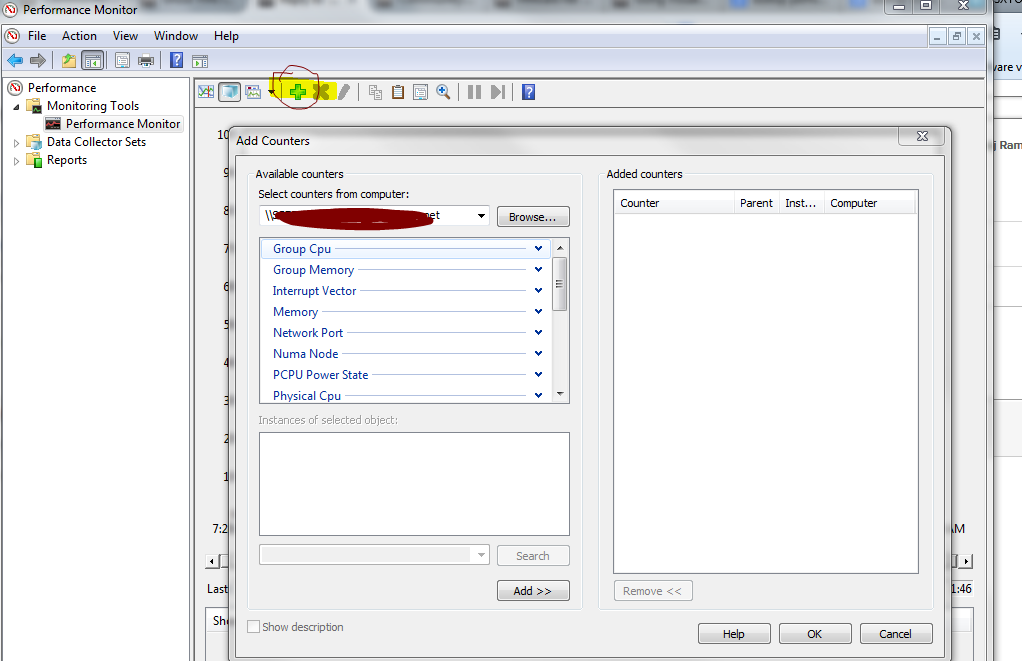
3)      Click source tab and add log file (captured csv file) and click ok and after that you might not see anything on the chart. Need to add the counters 


4)      then you can add your required object and counters and click OK ( below example I have choose n1kv VM 
5)      Finally you may able to see all of your required data charts. ( since I have chosen 1kv VM as example, there is no much load on the vm)

Monday, August 11, 2014

reset VCOPS admin Password

Log in to UI VM console and 

  1.  cd to /usr/lib/vmware-vcops/user/conf/install and
  2. Type ./resetadminpwd.sh <newpassword> 
  3. If you are still having issues logging in see if the account is locked out by typing su admin Twice -- It will show "Account locked due to xx failed login"
  4. Type "Pam_tally --user admin --reset" to reset. 
  5.  then reboot VCOPS 

Friday, March 28, 2014

After patching ESXi, Esxi disconnected from 1000V Cisco Switch (root cause is UUID all zero's)

Last week, I had patched 2 of  my ESXi that running on UCS. after I did patching,  I checked these 2 ESXi's standard and 1000V switch network configurations and port groups, everything was available and released system to production.

since my DRS in partially automated mode, This week, my colleague moved some servers to these ESXi and he found that VM's network connection failed.

I logged in to V center and found that  in Distributed 1000 V switch trust up-link and UN-trust unlink VLAN access has been changed to native VLAN 1 as below


then I have logged in to the 1000V switch and checked the VEM modules. I  found that one of the issue server UUID had changed all zero's and another server  VEM module was missing


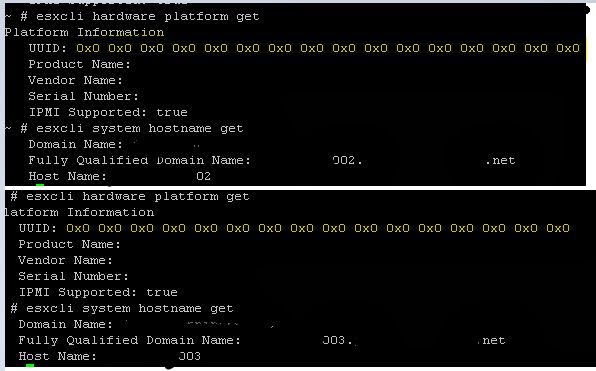
Therefore i have logged in to both issue ESXI and checked Hardware UUID.  found as below that these two servers Hardware UUID is all Zero

So I assumed that Since the both system has all zero's in UUID, the 1000V is connected with first  system that I rebooted first ( eventhough all zero's, it's unique ID) and the second server was not connected because it has the same all zero's Unique ID and it's conflicted.

Solution: as I mentioned these EXI running on UCS, I rebooted these blade servers more than twice but the UUID was not changed from all zero's.  So I updated the BIOS version of both blade servers and The UUID has changed to the original and both ESXI system was connected to 1000V switch and network connection also established very well as usual.


Sunday, December 29, 2013

How to Monitor Vcenter alarm using Monitoring agent tool such as SCOM opmanager

There are many ways  to monitor v center alarm. here I would like to share how to monitor v center alarm that installed on windows OS with monitoring tools such as SCOM.

components:

1) microsoft eventcreate.exe tool

2) monitoring tool agents

steps:

1)  create the pre list with the custom event ID and description as below.
create alert at cluster , hosts and VM level as well data store level and   where ever it's needed

example list:

Host level:
101.  Vcenter Alerting Host Connection failure for ESXI Server
102.  Vcenter Alerting Host battery status
103.  Vcenter Alerting Host Baseboard Management Controller status
104.  Vcenter  Alerting Cannot connect to storage status
105.  Vcenter  Alerting Host cpu usage
106. Vcenter  Alerting Host hardware fan status
107. Vcenter  Alerting Host hardware power status
108. Vcenter Alerting for Host hardware system board status
109. Vcenter Alerting for Host hardware temperature status
110. Vcenter Alerting for Host memory status
111. Vcenter Alerting for Host processor status
112. Vcenter Alerting for Network connectivity lost
113. Vcenter Alerting for Network uplink redundancy degraded
114. Vcenter Alerting for Network uplink redundancy lost
115.  Vcenter Alerting for Storage Path Alert
116. Vcenter Alerting for Host memory usage


2) In the alarm configuration , instead of using "send a notification trap" option,  you have to use " Run a command"  option in actions tab and it will execute the eventcreate.exe file to generate custom event ID in windows event viewer logs under application. 

please add this line in configuration tab   C:\Windows\System32\eventcreate.exe /t warning /id 101 /d "Host connection failure for host123, please check ESXI server on datacenter 1 cluster 1"

info about eventcreate.exe settings  http://technet.microsoft.com/en-us/library/bb490899.aspx 


so this will generate event id 101 in event viewer application logs with the description "Host connection failure for host123, please check ESXI server on datacenter 1 cluster"  as below


As you know, all the operation manager tool has option to monitor each and every windows event ID in it's configuration.  just install agent and configure op manger to monitor these custom event ID's. thats all


example from scom alert for data store usage