Last week, I had patched 2 of my ESXi that running on UCS. after I did patching, I checked these 2 ESXi's standard and 1000V switch network configurations and port groups, everything was available and released system to production.
since my DRS in partially automated mode, This week, my colleague moved some servers to these ESXi and he found that VM's network connection failed.
I logged in to V center and found that in Distributed 1000 V switch trust up-link and UN-trust unlink VLAN access has been changed to native VLAN 1 as below


then I have logged in to the 1000V switch and checked the VEM modules. I found that one of the issue server UUID had changed all zero's and another server VEM module was missing

Therefore i have logged in to both issue ESXI and checked Hardware UUID. found as below that these two servers Hardware UUID is all Zero
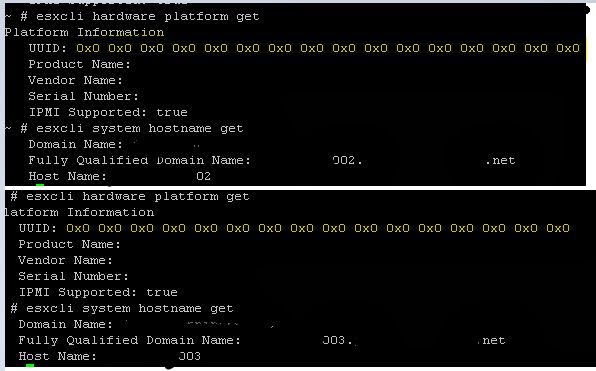
So I assumed that Since the both system has all zero's in UUID, the 1000V is connected with first system that I rebooted first ( eventhough all zero's, it's unique ID) and the second server was not connected because it has the same all zero's Unique ID and it's conflicted.
Solution: as I mentioned these EXI running on UCS, I rebooted these blade servers more than twice but the UUID was not changed from all zero's. So I updated the BIOS version of both blade servers and The UUID has changed to the original and both ESXI system was connected to 1000V switch and network connection also established very well as usual.

since my DRS in partially automated mode, This week, my colleague moved some servers to these ESXi and he found that VM's network connection failed.
I logged in to V center and found that in Distributed 1000 V switch trust up-link and UN-trust unlink VLAN access has been changed to native VLAN 1 as below
then I have logged in to the 1000V switch and checked the VEM modules. I found that one of the issue server UUID had changed all zero's and another server VEM module was missing
Therefore i have logged in to both issue ESXI and checked Hardware UUID. found as below that these two servers Hardware UUID is all Zero
So I assumed that Since the both system has all zero's in UUID, the 1000V is connected with first system that I rebooted first ( eventhough all zero's, it's unique ID) and the second server was not connected because it has the same all zero's Unique ID and it's conflicted.
Solution: as I mentioned these EXI running on UCS, I rebooted these blade servers more than twice but the UUID was not changed from all zero's. So I updated the BIOS version of both blade servers and The UUID has changed to the original and both ESXI system was connected to 1000V switch and network connection also established very well as usual.


